
Game Library Intelligence
Bring detected games from supported launchers into one searchable library. Filter by launcher or size, keep favorites close, and open games in their own launcher. Available metadata varies by launcher.
A quieter command center for your PC
Find your games, understand your storage, and review safe cache cleanup. One Windows workspace for the library you’ve built — across Steam, Epic, Xbox, GOG and more.
Inside RUNEHOLM
A clear overview, a searchable library, and cleanup you can inspect. These are real app screens with fictional sample data.
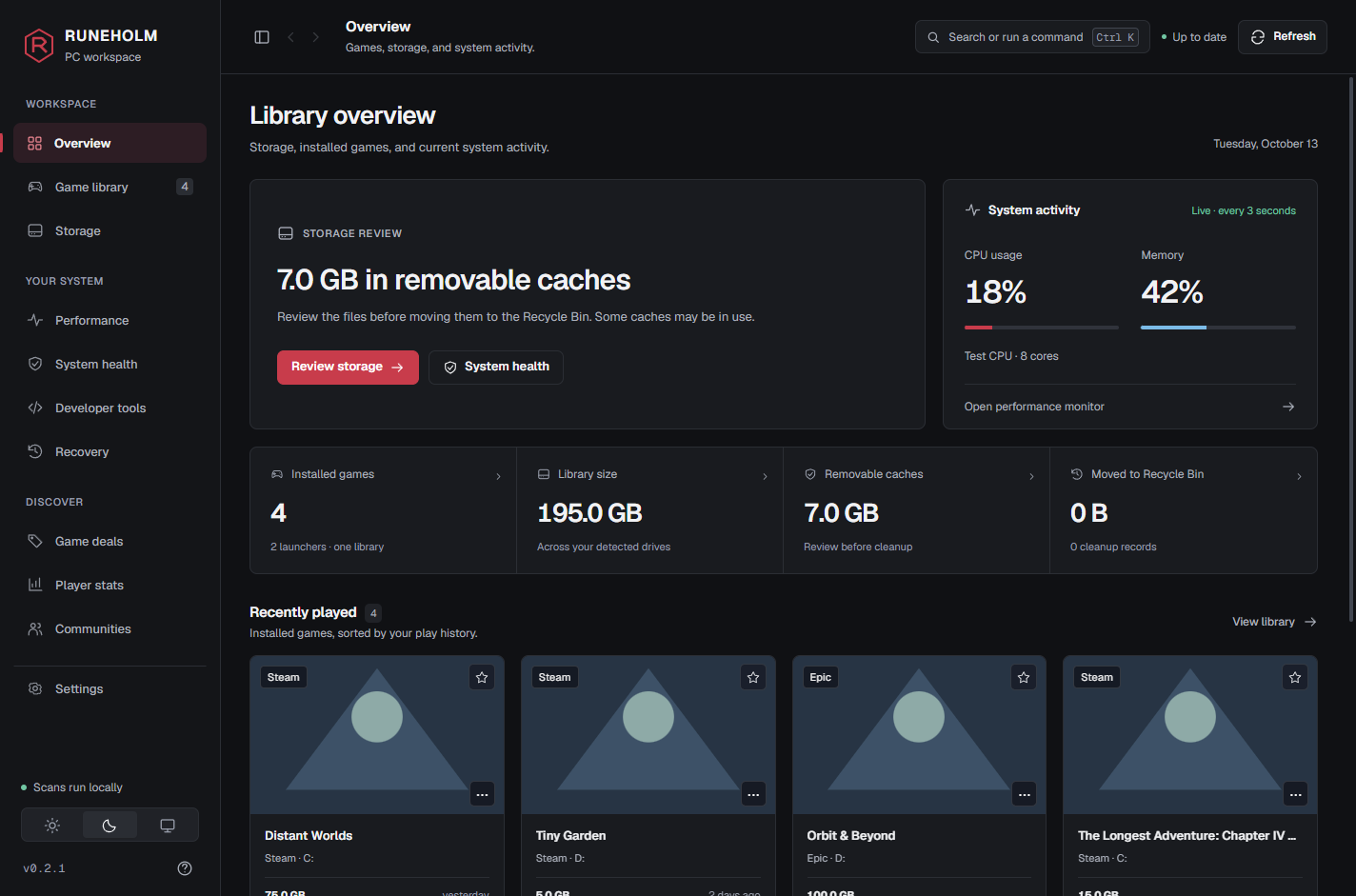
Start with a useful overview of your PC, then choose what to inspect.
v0.2.2 · sample dataIn one sentence
A growing library deserves a clear view. RUNEHOLM reports what it finds on your machine.
No estimated savings claims. Cleanup results depend on the caches found and the items you approve.
The command center
Bring detected games from supported launchers into one searchable library. Filter by launcher or size, keep favorites close, and open games in their own launcher. Available metadata varies by launcher.
Inspect supported shader caches, temporary files and crash dumps before approving a Recycle Bin move. Game leftovers and duplicate findings are for review; RUNEHOLM does not automatically delete game folders.
Follow CPU and memory readings, inspect busy processes, and pause monitoring when you choose. GPU readings depend on your hardware. Missing sensors are shown as unavailable, not guessed.
Browse PC game deals and jump to community or public profile destinations. Optional online features use external services; your local library is not uploaded to this website.
Three steps
Start with a read-only pass through supported drives and game launchers. Background scans fill in more detail while you explore.
Sort your detected games, inspect drive capacity, and review the size and location of cleanup candidates.
Select supported cache items and approve the confirmation. Successful moves go to the Recycle Bin; locked or failed items are reported.
Deal Radar Optional live prices
Start with a clearly labeled preview. Accept optional live prices to load deals from CheapShark, then shuffle the selection. Prices are in USD and availability varies by store and region; confirm the current price at checkout.
Representative preview — live prices are optional.
Your Communities
For the games on your rig, RUNEHOLM pulls the scene together — the official site, the subreddit and the Discord — so you're one click from where players actually gather, not ten tabs deep. Every link below is real. Try one.
The promise
Cleaners got a bad name for a reason. RUNEHOLM is the opposite of scareware.
For your other kind of library
Own Forever includes developer clutter analysis: inspect package caches and node_modules folders before approving supported cleanup. Docker usage and build artifacts are report-only. Repositories are never silently removed.
Clear expectations
Useful tools with explicit boundaries, from the first scan to your next update.
| Tool | What to expect |
|---|---|
| Library | Local detection across supported launchers. Metadata varies by launcher. |
| Cleanup | Review supported caches, then approve Recycle Bin moves. Game installs and saves stay excluded. |
| Performance | Measured readings where available. No promised FPS gain or guessed sensor values. |
| Online features | Deals, artwork, public profiles, activation and updates contact their providers. |
| Recovery | Inspect cleanup records and restore from the Recycle Bin while items remain there. |
| Developer tools | Own Forever adds deeper analysis. Docker and build artifacts remain report-only. |
Core scans and safe cache cleanup are free. You choose when to try or buy the upgrade.
Simple & honest
Start with the free tools. Own Forever adds developer analysis and deeper duplicate reports with a one-time purchase.
$0forever
Everything you need to take back your drive.
$7.99one-time · yours forever
Pay once. No subscription. For power users, collectors and devs.
One-time $7.99 — no subscription, ever. Download free, then unlock Own Forever in-app or right here. A 7-day Pro trial is built in.
Straight answers
Yes. Every scan is read-only, and nothing is deleted, moved or “cleaned” without you explicitly approving it. You always see the exact files and the exact gigabytes first.
Automatic cleanup excludes game installs, saves and personal documents. Supported caches are moved to the Recycle Bin only after approval. Game leftovers and duplicate findings are for review; launcher-managed uninstall actions stay with the launcher.
The core library scans, storage views, safe cache cleanup, performance readings and community hubs are free. Own Forever is a one-time $7.99 upgrade for developer tools and deeper duplicate analysis, with an optional seven-day trial and no automatic renewal.
Windows 10 and 11 today. macOS is planned but not built yet — there is no macOS download.
No — on purpose. Registry cleaning and “RAM boosters” are placebo tactics that gave the category a bad name. RUNEHOLM only reclaims real disk space and shows you real, honest performance data.
Your drive and library scans stay local. Optional deals, Steam artwork or profiles, purchase activation and update checks contact their respective providers. This site does not scan your PC. Read the privacy notice for the service-by-service details.
It brings supported game libraries, drive space and performance readings into one workspace. Cleanup is a review-and-confirm flow, with no registry cleaner or promised FPS gain. Optional deals and community links complement the local tools.
Now — it's a free download for Windows. This is an early build, and the installer isn't code-signed yet, so Windows will warn that the publisher is unknown.